Overview
Only SSO and user accounts can authenticate to a Hydrolix cluster. Once authenticated, these users may also acquire authorization tokens.
Service accounts can only use authorization tokens generated and managed by authenticated users. Service accounts are for any programmatic or automated interactions with Hydrolix applications.
Administrators control and assign access to accounts using roles defined in a flexible Account Permissions (RBAC) system.
Permissions are associated with accounts. The unified auth system enforces permissions at time of use and allows administrators to modify roles. After a permission change, clients can use existing tokens to access updated permissions.
Manage users with the web UI or Config API.
This page describes authentication mechanisms to a Hydrolix cluster, and authorization tokens, also occasionally known as bearer tokens after their type.
Access enforcement⚓︎
Hydrolix ensures that one of these conditions is true for each request, or it denies access:
- The request includes a valid authorization token in HTTP header
Authorization: Bearer $AUTH_TOKEN - The web browser client includes a valid authorization token in a cookie
- The endpoint supports HTTP basic access authentication and the request includes valid user credentials
- The path is an exempt path, necessary for pages like login and password reset
- For non-HTTP services, the client presents valid user credentials or the special username
__api_token__and a valid authorization token in the password field
For some endpoints, successful authentication alone isn't sufficient. When enabled, Traefik route authorization enforces additional per-endpoint permission checks after authentication.
Traefik route authorization⚓︎
When the enable_traefik_authorization tunable is set to true (default: false), Hydrolix enforces additional permission checks on requests routed through Traefik. These checks apply after authentication succeeds and regardless of authentication methods such as token, cookie, or basic auth.
Authenticated users must hold the corresponding permission in their assigned roles to access the following endpoints:
| Endpoint | Required permission | Scopes |
|---|---|---|
/ingest/event (see Custom ingest pools) |
ingest_table |
organization, project, or table |
/kibana |
view_kibana |
only global |
/grafana |
view_grafana |
only global |
/prometheus |
view_prometheus |
only global |
/superset |
view_superset |
only global |
/version |
view_version |
only global |
Custom ingest pools are subject to RBAC
Using enable_traefik_authorization applies to all ingest pools. This means any intake-head pool created through Resource Pools is subject to the same ingest_table permission check.
For /ingest, the ingest_table permission is scoped to a table, project, or organization. Traefik identifies the target table from the x-hdx-table HTTP header or the table query parameter and checks whether the user's token carries ingest_table for the project containing the table. The remaining service permissions are scoped globally. If the user lacks the required permission, Traefik returns a 403 Forbidden response.
For details on creating roles with these permissions, see RBAC How-to: Assign Role to User. For the complete list of permission codenames, see Permissions Reference.
System description⚓︎
The Config API is the center of the unified auth system.
It depends on Keycloak for hashing and storage of user passwords and signing of user account tokens.
Signing and validation of service account tokens is handled by the Config API using a keypair stored in SERVICE_ACCOUNT_PUBLIC_KEY and SERVICE_ACCOUNT_PRIVATE_KEY Kubernetes general secret.
Other APIs and applications in the cluster call Config API for authentication, authorization, and access control decisions. All services and endpoints accept authorization tokens. Some API calls and services accept credentials as well. See the use case chart below for a detailed listing.
Use cases⚓︎
| Service / application | User account creds | SSO user account | Authorization token | Using Kubernetes Secret |
Traefik RBAC |
|---|---|---|---|---|---|
| Hydrolix UI | Required for login | Required for login | From httpOnly Cookie after login |
No | No |
| Config API | Login only | Use service account | Yes, except login | No | No |
| HTTP Stream API | Yes | Use service account | Yes | Yes | ingest_table |
| HTTP Query API | Yes | Use service account | Yes | No | No |
| ClickHouse HTTP | Yes | Use service account | Yes | No | No |
| ClickHouse Native | Yes | Use service account | Yes | No | No |
| MySQL | Yes | Use service account | Yes | No | No |
/validator |
Yes | Yes | Yes | Optional | No |
/version |
Yes | Yes | Yes | Optional | view_version |
| Prometheus UI | Yes | Yes | Yes | Optional | view_prometheus |
| Grafana | Yes | Yes | Yes | No | view_grafana |
| Superset | Yes | Yes | Yes | No | view_superset |
| Kibana | Yes | Yes | Yes | No | view_kibana |
Authentication mechanisms⚓︎
There are several authentication mechanisms for interacting with a Hydrolix cluster, depending on the account type. Only SSO and user accounts can authenticate to the unified auth system in a Hydrolix cluster.
- User accounts are locally managed and authenticated by the Config API, credentials stored in Keycloak
- Single-sign on (SSO) authentication is handled by an identity provider. Administrators configure the Keycloak system to delegate authentication responsibility to the identity provider. Keycloak then manages an identity and authorization token for the SSO account.
After successful authentication in the UI, a supplied cookie with authorization information allows web browsers using the Hydrolix UI and other in-cluster services like Prometheus, Grafana, and Superset. The cookie contains an authorization token.
After successful authentication in the API, the client can store the supplied authorization token and use it for its validity lifetime.
For select services, basic authentication is available, managed in the reverse proxy layer. This provides an alternative for diagnostic and administrative purposes. Incompatible with the Config API and the rich Account Permissions system.
Authentication with user credentials⚓︎
HTTP-based services⚓︎
For programmatic access, Hydrolix recommends using authorization tokens. They perform better for repeated requests.
Clients present authorization tokens in the HTTP header Authorization: Bearer ${BASE64_ENCODED_CREDENTIALS}.
Some HTTP endpoints also accept user credentials conveyed using HTTP basic access authentication.
Clients present credentials in the HTTP header Authorization: Basic ${BASE64_ENCODED_CREDENTIALS}.
For browser interactions see Cookies.
Non-HTTP services⚓︎
For non-HTTP database interfaces, there are two ways to gain access
- servers accept user credentials
- servers accept authorization tokens with the special username:
__api_token__
The special username __api_token__ allows non-HTTP server applications to receive an authorization token in the password field. Access is allowed only if the authorization token is valid.
Authorization tokens⚓︎
For programmatic access, authorization tokens are the primary and recommended mechanism. For browser interactions see Cookies.
An authorization token is always associated to exactly one user, SSO, or service account. Tokens are implemented as signed JSON Web Tokens (JWTs) issued to specific accounts. See also Account types.
Services accept these tokens in the HTTP header Authorization: Bearer ${AUTH_TOKEN} and check access rights for the linked account. Access is denied to resources or endpoints unless account permissions grant access.
See Non-HTTP services to present an authorization token in the password field for query interfaces like ClickHouse Native and MySQL.
Authorization tokens are an implementation of RFC 6750, The OAuth 2.0 Authorization Framework: Bearer Token Usage.
Acquire authorization tokens⚓︎
Only authenticated users may retrieve, create, delete, or revoke authorization tokens.
Local user accounts can use the Login to Hydrolix endpoint to acquire an authorization token.
SSO accounts can't receive an authorization token through the usual login flow. Instead, SSO users with sufficient permissions can create service accounts and tokens. For a workaround, see how to extract an authorization token by inspecting cookies.
The unified auth system issues tokens to authenticated users and validates any authorization tokens presented to APIs, network services, and the Hydrolix UI.
Each token has a validity lifetime and is associated with a single account, of type user, SSO, or service.
User authorization tokens⚓︎
An authorization token for a user account is valid for 24 hours. This token authorizes access for its lifetime without requiring the client to authentication again or send credentials over the network for every request.
Service account authorization tokens⚓︎
Authorization tokens issued to service accounts are revocable and have a default lifetime of one year. Tokens can be generated using the API or UI by accounts with permissions to manage service accounts. See Service Accounts.
Cookies⚓︎
Users authenticating to the Hydrolix UI with account credentials or with SSO receive an httpOnly cookie containing an authorization token visible to the browser, but not the Javascript Hydrolix UI. The browser includes the cookie on subsequent requests, ensuring that the cluster's Config API application receives the token.
Cookies contain the following parameters:
| Parameter Name | Value | Description |
|---|---|---|
| HttpOnly | (present) | Cookie stored by browser, inaccessible to client-side JavaScript |
| Max-Age | 86400 | Seconds until the cookie expires (24 hours) |
| Path | / | Any path is accepted |
| Secure | (present) | Only HTTPS requests can contain cookies |
| SameSite | Strict | HTTP client only sends cookie for requests from the same domain |
It's possible to extract the authorization token from a cookie.
Don't rely on authorization tokens from cookies
While it's possible to extract authorization tokens from cookies for short term testing, these tokens have an inconveniently short 24-hour lifetime.
This is inconvenient for programmatic usage. Use service accounts instead.
Example command-line cookie retrieval⚓︎
This example shows how to programmatically retrieve cookies.
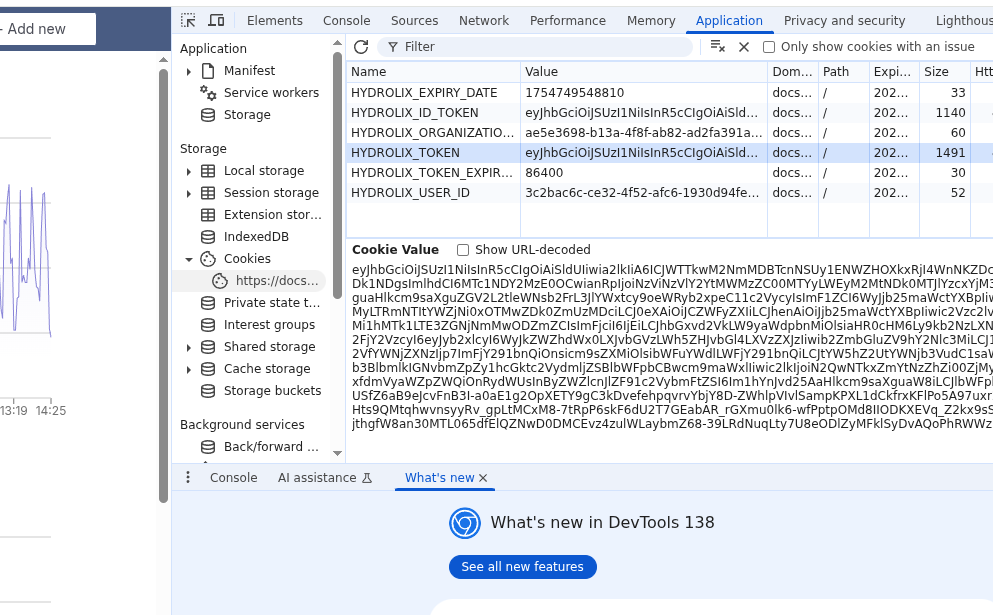
Example browser cookie screenshot⚓︎
Inspect the cookie jar using developer tools in the browser to find the cookies.
Browsers support development and inspection tools. Use these tools to locate the cookie.
- Open web developer tools.
- Navigate to display of locally stored cookies. a. Firefox: Navigate to Storage > Cookies. b. Chrome: Navigate to Application > Cookies.
- Inspect or retrieve the contents of
HYDROLIX_TOKEN.
Basic authentication⚓︎
Administrators can configure some endpoints to support HTTP Basic Access Authentication using a Kubernetes Secret to store the credentials.
Not a part of unified auth system
The other authentication and authorization features described here participate in the unified auth system. The basic auth feature exists separately and is incompatible with the Config API and the rich Account Permissions system.
This authentication mechanism is managed outside of the Keycloak unified auth system in the cluster's reverse proxy software. It provides an alternate for administrative, diagnostic, and monitoring purposes. See Enable Basic Authentication.
Exempt paths⚓︎
Several cluster URL paths outside of the Config API are necessarily exempt from authentication and authorization requirements to provide services like redirection or hostname verification. Here are some examples:
/login- redirects to Hydrolix UI main login page/password-reset- redirects to Hydrolix UI password reset request endpoint/.well-known/acme-challenge/- HTTP challenge response files for proof of control of a domain name, see Hydrolix ACME Client
Reporting⚓︎
The unified auth system generates Authentication Audit Logging events, retrievable using the Get auth logs endpoint.
Also, view reports of usage, including valid and invalid requests per token, in your Hydrolix cluster's Prometheus reporting.