Overview
Hydrolix includes an automated compaction and optimization service as part of the data lifecycle. This service is enabled by default for all tables and merges partitions for efficient storage and accessibility.
Merge system purpose⚓︎
The merge service continuously combines smaller existing partitions toward an optimal long-term storage size. Because the ingestion system is optimized to make data available to the query system quickly, it creates many small partitions. The same data compresses better into fewer, larger partitions.
By swapping in the more compact partitions, new queries can retrieve and process the data more efficiently. Queries that have already started can still refer to the older partitions before they're discarded.
The result of the partition-merging work is both better-performing queries and a smaller storage footprint for the same data.
- See Decay and Reaper to understand how partitions are safely discarded.
- See the Merge platform overview to understand how the merge service fits into the Hydrolix architecture.
The compaction process collects time intervals from smaller partitions into a larger partition as illustrated in this diagram.
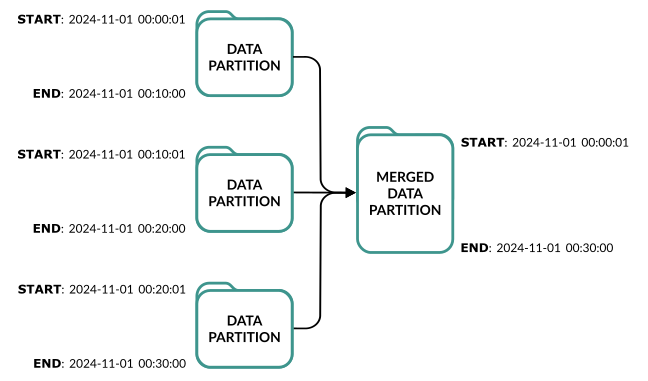
Merging partitions is a bin-packing exercise. The goal is to combine sets of smaller partitions with varying sizes into the smallest number of larger partitions without exceeding fixed size limits.
Merge controller⚓︎
The merge-controller is the central service constructing eligible candidates and coordinating pools of merge-peer workers.
---
config:
  themeVariables:
    fontSize: 18px
---
flowchart LR
    classDef default stroke:#00A99D,stroke-width:2px
    CAT[(Catalog)]
    MC[merge-controller]
    P[merge-peer pools]
    S[(Storage)]
    CAT -->|partition stream| MC
    MC -->|candidates over gRPC| P
    P -->|R/W| S
P -->|completion report| MCConfiguration⚓︎
The merge controller continuously constructs a plan for combining existing partitions and assigns that work to merge peers. The lists of partitions are called candidates.
To complete an assignment, a merge peer
- creates a new partition containing the data from the originals
- uploads the new partition to object storage
- modifies the catalog atomically, making the new partition live and deactivating the originals
- reports success to the merge controller
A healthy cluster has a fluctuating number of candidates as new partitions are written and existing partitions become eligible for compaction.
Use these tunables to influence merge controller resources for building candidates.
merge_max_candidates- limits the number of candidates awaiting dispatch to merge peers. When adding more merge pools and peers, avoid a drop in throughput by raising this value to keep work available for the merge peers. Higher values increase memory usage. Hydrolix recommends setting this to 500.merge_max_partitions_per_candidate- limits the number of partitions merged together in a single operation. Higher values allow more partitions per candidate, but may impact the cluster's merge capacity.
Increasing these tunables allows the merge controller to consume more memory and to improve merge throughput.
| Example of Increased Tunable Limits for Merge Controller | |
|---|---|
Because higher values increase memory usage, monitor pod restarts for OOM kills and watch for usage approaching pod limits.
Memory and performance⚓︎
Performance depends on many factors. Merge peer replica count, original partition size and shape, partition eligibility, and resources devoted to the merge controller all influence performance.
The merge controller holds in memory all candidates pending and in flight, as well as tracking information for all merge peers. This design centralizes memory usage for merge system state in the merge-controller pod, keeping the cluster's overall CPU and storage access demands low.
Merge controller memory correlates with
- high ingest volume, which creates more partitions eligible for consideration by the bin-packing algorithms
- the number of simultaneous active merge operations
- the count of merge peer pools and merge peers, all receiving assignments over gRPC
When encountering a backlog of partitions eligible for merge, adjust merge controller merge_max_candidates and available memory to avoid the candidate construction limit. For detailed instructions on tuning the merge services in a cluster, see Merge and autoscaling.
Replicas and resilience⚓︎
The merge-controller pod runs as a single replica. On startup, it refuses to bootstrap if another merge-controller is running.
Both merge peers and the controller are resilient to normal and abnormal termination conditions, such as manual restarts, scale changes, pod evictions, and OOM kills.
- A merge peer receives work only from the merge controller.
- Each merge peer continues working even if its gRPC connection to the merge controller terminates.
- Each merge peer swaps the new and original partitions in the catalog in an atomic transaction.
- A disconnected merge peer repeatedly attempts to reconnect to the merge controller.
- On restart, the merge controller reconstructs system state from both the catalog and the reconnecting merge peers.
- A reconnected merge peer reports its assignment status and availability to the merge controller.
- If a merge peer fails to complete its assignment, the merge controller rediscovers the partitions in the catalog when computing the next set of candidates.
- After reconstructing system state, the merge controller continuously reads the catalog and assigns new work to available peers.
Merge and autoscaling⚓︎
This section provides guidance for using the HDX Autoscaler with Prometheus to adapt merge peer resources to ingestion and merge system demands.
Metric candidates and autoscaling⚓︎
The merge controller exposes a Prometheus gauge candidates counting the number of partition groups waiting to be dispatched to merge peers. The metric is labeled per project, table, pool, and target. The target label maps to the merge peer era, such as I, II, or III. Eras correspond to Merge pools.
Construction limit⚓︎
The merge controller limits memory usage by pausing construction of new candidates once its buffer reaches merge_max_candidates. For this reason, the candidates metric plateaus at the limit of merge_max_candidates. If the HDX Autoscaler with Prometheus scales merge peers based on this metric, it can't see demand beyond the plateau and won't provision additional pods. To set an alert that checks the candidates metric against merge_max_candidates, see Configure Alerts in Grafana.
Hydrolix recommends setting merge_max_candidates to 500.
Higher values increase memory usage
Monitor the merge-controller pod for OOM kills after increasing this value.
If the candidates metric is persistently at merge_max_candidates, check the current replica count for the affected pool and apply the appropriate fix:
- Replicas are below the configured maximum. Reduce
target_valuein the pool'shdxscalersconfiguration. A lower target value causes the autoscaler to request more replicas for the same metric value. For example, loweringtarget_valuefrom 50 to 25 doubles the targeted replica count. - Replicas are already at the configured maximum. Increase
maxin the pool'shdxscalersconfiguration to give the autoscaler room to add pods.
Once the metric drops below the plateau, return target_value and replica limits to their normal range.
Tune the autoscaler aggregation⚓︎
See HDX Autoscaler with Prometheus to scale merge-peer replicas based on the candidates metric. Configure this in the hdxscalers section of a service or pool. Set the op parameter to control how multiple samples across tables and targets are aggregated. Supported values are sum, avg, min, and max. If op isn't set, the autoscaler uses only the first sample it encounters, which may undercount demand. For clusters with multiple high-volume tables, sum or max is best.
This example scales the merge-peer-iii pool between 1 and 10 replicas, targeting 50 candidates across all pods, with sum aggregating across all tables and targets.
| Example Autoscaler Block for Merge Peer | |
|---|---|
Use this query to monitor for saturation.
OOM recovery and self-tuning⚓︎
Merge peer pods can be OOM-killed when a merge candidate requires more memory than the container limit allows. When this happens, the partitions from the failed merge become eligible again and are included in future candidates. The merge controller also tracks actual memory usage per merge and adjusts future estimates using an exponentially weighted moving average. Over time this reduces the likelihood of OOM kills for similar workloads. After a cluster first encounters OOM events for a given table, allow several merge cycles before intervening.
If a merge peer pool shows persistent OOM restarts that don't resolve after several cycles, the container memory limit likely needs to be increased. See Troubleshoot merge peer OOM for steps to identify which container is affected and how to apply the fix.
Scale horizontally or vertically⚓︎
When merge is falling behind, the right response depends on the symptom.
Scale horizontally by adding merge peer replicas when the candidates metric is consistently high or saturated. This means there's enough work for more pods to process in parallel.
Scale vertically by increasing memory per pod when individual merge peers are OOM-killed persistently. This means the partitions being merged are too large for the current memory limit. See Troubleshoot merge peer OOM for steps to diagnose and resolve this.
Disable merge on tables⚓︎
All tables have merge enabled by default. Disable and re-enable merge with the Patch table endpoint. Disabling merge stops new merge jobs immediately, but jobs already in the queue complete.
Disable merge only under special circumstances
Disabling merge isn't recommended, and may result in performance degradation.
For example, this API request enables merge for a given table:
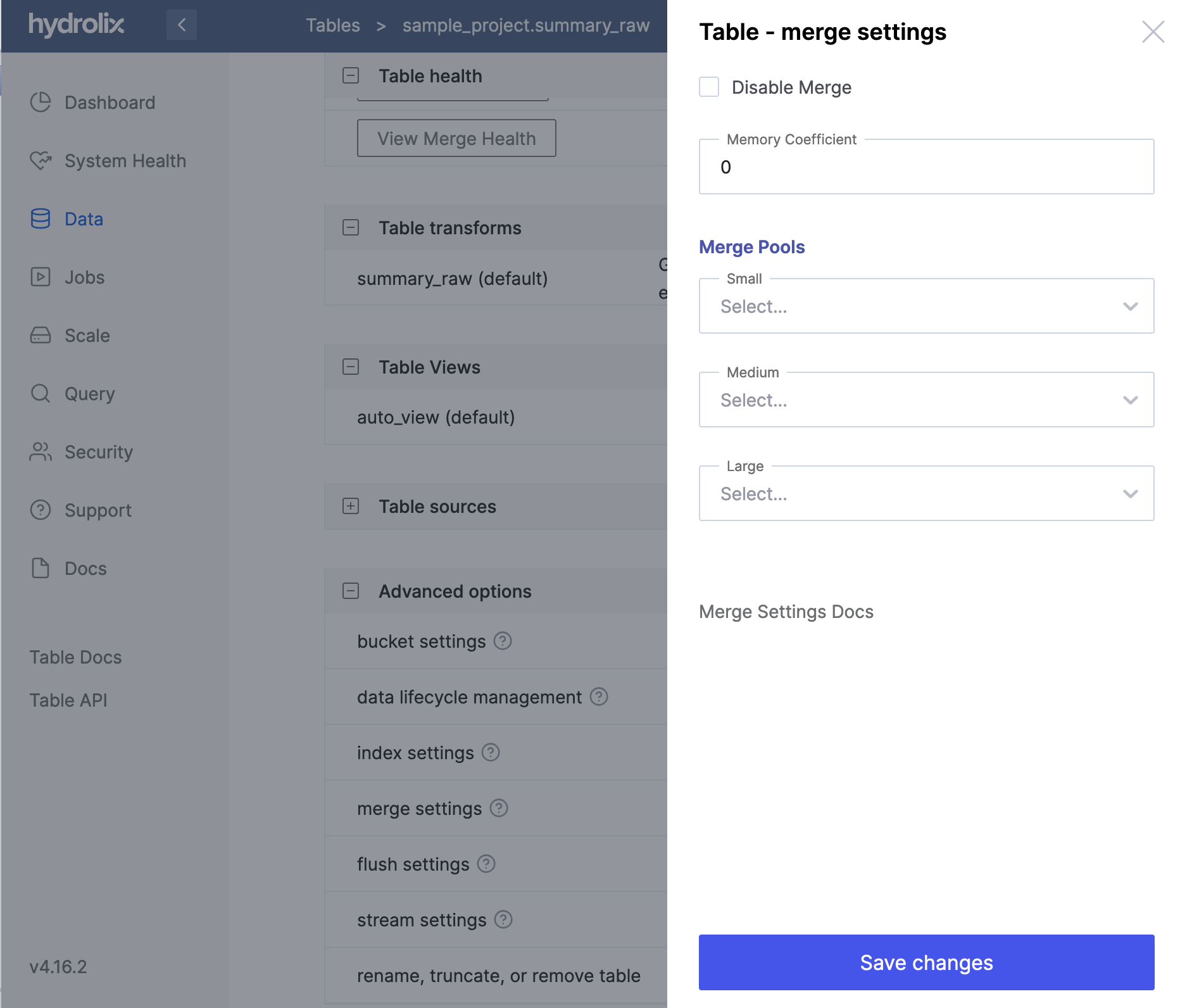
To disable merge in the Hydrolix UI, navigate to Data, select the table, find Merge settings under Advanced options, select the three dots on the right of that row, and select Disable Merge.
Merge pools⚓︎
Hydrolix clusters create merge components in three pools: small, medium, and large. These three sizes each handle different partitions that are differentiated by several criteria. This ensures optimal partition sizing and spreads merge workloads across old and new data.
This table shows the criteria used to assign partitions to merge pools:
| If the max Primary Timestamp is: | ...and the size is within: | ...and the time width is within: | Resulting Merge Pool |
|---|---|---|---|
| Under 10 minutes old | 1 GB | 1 hour | small (merge-i) |
| Between 10 minutes and 1 hour old | 2 GB | 1 hour | medium (merge-ii) |
| Between 1 hour and 90 days old | 4 GB | 1 hour | large (merge-iii) |
For example, a partition with a last timestamp 15 minutes ago, a size of 513 MB, and a width of 37 minutes goes to the medium pool.
A 2.5 GB partition isn't eligible for merge until 1 hour after its last timestamp, and goes to the large pool only if other eligible partitions smaller than 1.5 GB exist to merge with.
Partitions older than 90 days aren't considered by default
The merge system looks back only 90 days for partitions eligible for compaction. This limit is configurable through merge_target_overrides.
📘 Primary timestamp For more information on primary timestamps, see Timestamp Data Types.
Custom merge pools⚓︎
To separate merge workloads and avoid “noisy neighbor” effects, create additional merge pools targeted at specific tables. For example, create a dedicated merge pool for a Summary Table to separate that workload from the main merge process.
Create custom merge pools with the Create pool endpoint, then refer to those pools in settings.merge.pools using the Tables endpoints.
Create pools⚓︎
This Config API command creates a custom pool using the pools API endpoint:
In the Hydrolix UI, select Add new from the upper right-hand menu, then select Resource pool.
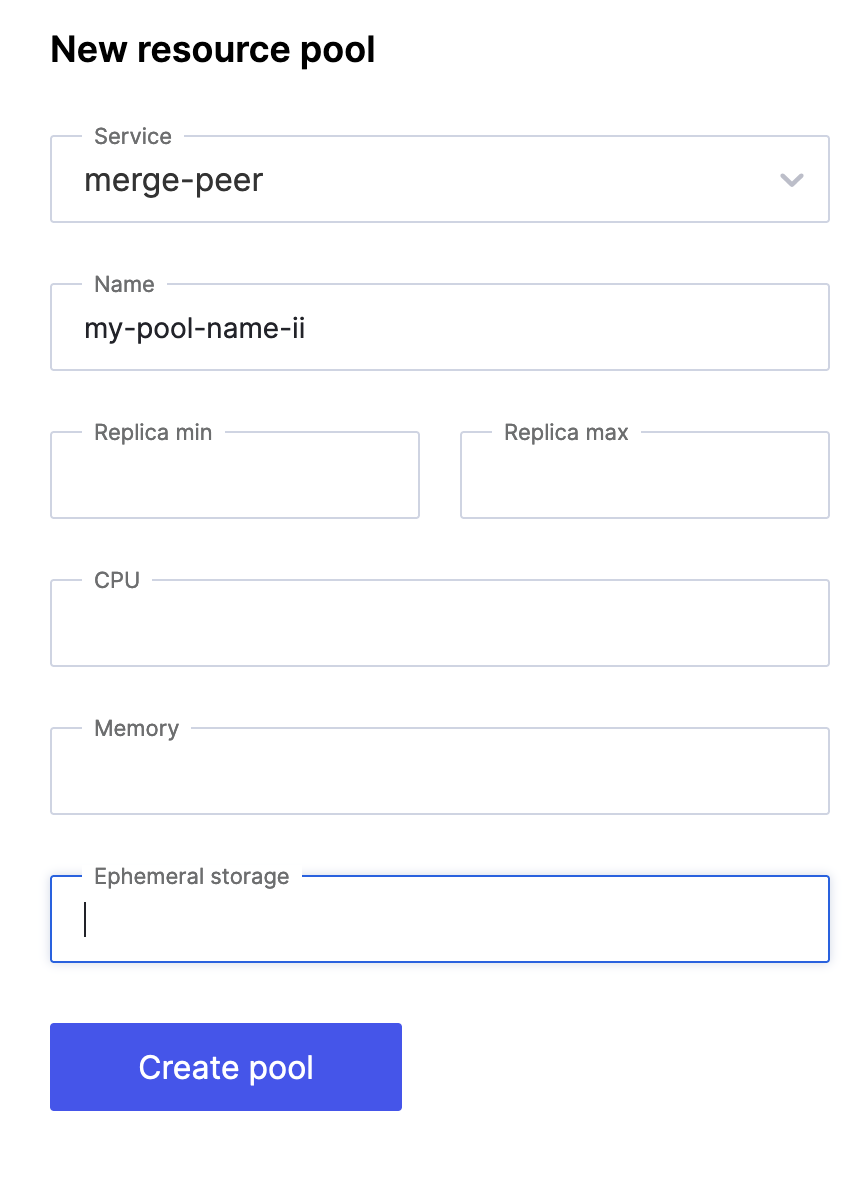
Use these settings to configure your pool:
| Object | Description | Value/Example |
|---|---|---|
service |
The service workload the pool uses. For merge, this is merge-peer. |
merge-peer |
scale_profile |
The merge pool size, corresponding to small, medium, or large. | I, II or III |
name |
The name used to identify your pool. | Example: my-pool-name-II |
cpu |
The amount of CPU provided to pods. | A numeric value, defaults are specified in Scale Profiles. Example : 2 |
memory |
The amount of memory provided to pods. | A string value, defaults are specified in Scale Profiles. Default units are Gi. Example:10Gi |
replicas |
The number of pods to run in the pool. | A numeric value or hyphenated range. Defaults are specified in Scale Profiles. Examples: 3 and 1-5 |
storage |
The amount of ephemeral storage provided to pods. | A string value, defaults are specified in Scale Profiles. Default units are Gi. Example: 5Gi |
Assign pools to tables⚓︎
This API request assigns custom pools to a table using the tables API endpoint:
To configure this in the Hydrolix UI, navigate to Data, select the table, find Merge settings under Advanced options, and select the pool assignment menu:
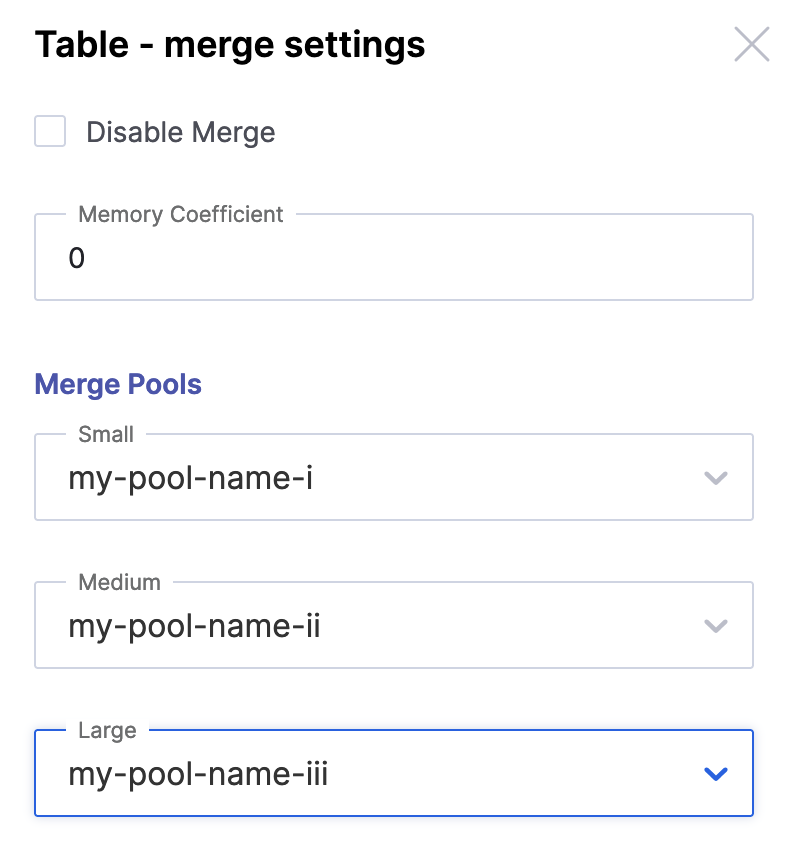
Use all three pools
For optimal merge performance, provide a large, medium, and small pool.
Something not working?
Start at Troubleshooting Symptoms and Fixes. Find the symptom, confirm it with the signal listed there, and follow the link to the procedure.
Troubleshoot merge peer OOM⚓︎
As described in OOM recovery and self-tuning, sporadic OOM kills don't require action. Follow these steps when a merge peer pool shows persistent OOM restarts that don't resolve on their own.
Each merge peer pod runs two main containers: the primary merge-peer container and a secondary merge-indexer container, which is the turbine sidecar that builds indexes for merged partitions. Each container has its own memory limit and they're configured independently.
Identify which container is being OOM-killed⚓︎
When a merge peer pod is OOM-killed, first determine which of the two containers reached its memory limit:
The output shows the terminated container name and reason. If turbine appears with Reason: OOMKilled, the merge indexer sidecar is the problem, not the primary merge peer container.
You can also check for recent OOM events across all merge peer pods:
If the OOM-killed container is turbine, increase the merge indexer memory using spec.scale.profile.
If the OOM-killed container isn't turbine and matches the pool name such as merge-peer-iii, increase memory in the pool definition's memory field instead.
Default merge indexer memory by era⚓︎
| Generation | Profile | Default merge-indexer memory |
Default CPU |
|---|---|---|---|
| Era I | I |
4 Gi | 2 |
| Era II | II |
6 Gi | 2 |
| Era III | III |
12 Gi | 2 |
Fix: increase memory on the merge indexer container⚓︎
Override the merge indexer memory through spec.scale.profile. Don't use the pool definition's top-level memory field as that controls the primary merge peer container, not the indexer. The two containers resolve their resources independently.
| Override Era III Merge-Indexer Memory in HydrolixCluster | |
|---|---|
Load the updated manifest into the cluster.
| Apply the Configuration | |
|---|---|
The operator detects the change and reconciles the cluster to match. No operator restart is needed.
Kubernetes rolls the affected merge-peer pods with the new resources.
See Custom Scale Profiles for an example of creating a named profile and attaching it to a pool.
Troubleshoot: useful queries⚓︎
Duration of merge (without upload to storage)⚓︎
Merge controller latency in communicating with query catalog⚓︎
Count of partitions tracked in memory⚓︎
Count of currently active merge operations⚓︎
Count of known partition segments⚓︎
Count of constructed candidates ready to be merged⚓︎
Count of fetched partitions awaiting segmentation⚓︎
Count of partitions sourced that are already tracked⚓︎
Count of connected clients⚓︎
Merge peer duty cycle⚓︎
Merge peers upload duration⚓︎
Race lost counter⚓︎
Merges completed⚓︎
Merges completed with failures⚓︎
Actual partition count by project and table⚓︎
Ideal partition count by project and table⚓︎
Merge efficiency by project and table⚓︎
Merge target efficiency compares the number of partitions a merge target has against the fewest it could have. Merge combines partitions only within the same hour, storage location, and shard key, so the comparison happens per group and the groups are then combined into one figure.
A group's minimum is its total partition size divided by the merge target's configured memory, rounded up. Raising a target's memory lowers its minimum for the same data. Empty partitions are excluded. Change a target's memory with a merge target override in the merge-controller configuration.
That minimum assumes partitions can be repacked freely, but merge combines whole partitions and no merge can exceed the target's memory. A target whose partitions are large relative to its memory can sit below 1.0 with no merging left to do, so compare a target against its own history rather than expecting every target to reach 1.0.
Three metrics combine the per-group results differently. All three sit between 0.0 and 1.0, and all are capped at 1.0.
| Metric | Combines groups by | Answers |
|---|---|---|
row_weighted_efficiency |
Partition count | How the target looks overall, with the groups holding the most partitions counting most |
mem_weighted_efficiency |
Memory size | Whether the bytes are well packed, so a small badly packed hour barely registers |
harmonic_efficiency |
Harmonic mean | Whether any single group is badly merged, because one bad group drags this figure down |
Despite its name, row_weighted_efficiency weights by partition count rather than by rows.