Prometheus Integration
Overview⚓︎
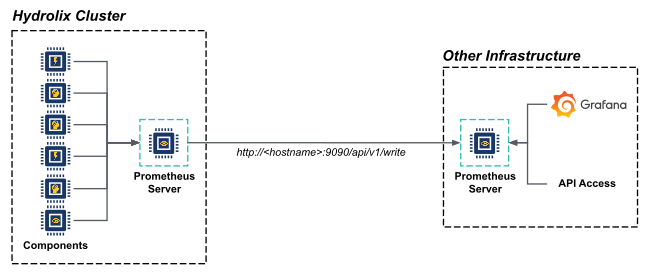
Prometheus in Hydrolix⚓︎
The Hydrolix stack includes Prometheus, an open-source metrics database. Hydrolix continuously updates its Prometheus instance with metrics information.
You can query, view, and actively monitor this information using a stack's Grafana instance, or you can access it with your own monitoring platform. See Prometheus Integration for more information about setting up Prometheus with an external server.
View metrics with Prometheus⚓︎
Access Prometheus directly in a web browser, or use an external Prometheus server.
Use the Prometheus UI⚓︎
Prometheus has its own web-based UI.
This view is a basic metric view, suitable for quickly entering queries and seeing simple, graphed results. This feature is available in Hydrolix without any additional setup.
Navigate to https://hostname.hydrolix.live/prometheus to view dashboards.
For more information about Prometheus metric types, refer to the Prometheus documentation.
Pass additional options to Prometheus⚓︎
Use a list of strings in the prometheus_extra_args tunable to append options after default flags set by Hydrolix.
Set a Custom TSDB Block Duration
For a list of available flags, see the Prometheus CLI reference, or see Prometheus storage.
Prometheus option resolution⚓︎
Prometheus settings come from and are resolved in the following order from lowest to highest priority:
- Prometheus: Built-in defaults
- Hydrolix: Default settings for Prometheus
- User-specified: Using
prometheus_extra_args(highest precedence)
See https://hostname.hydrolix.live/prometheus/config for current Prometheus settings.
If a user-configured flag conflicts with a built-in Prometheus default, the value in prometheus_extra_args overrides the default one. This results in the following resolution by flag type:
- Scalar flags accept a single value. If a scalar flag in
prometheus_extra_argsconflicts with a Prometheus built in or Hydrolix-specified default, the value inprometheus_extra_argsoverrides it. - Cumulative flags accept multiple values. If a flag in
prometheus_extra_argsmatches a built-in cumulative flag (for example,--enable-feature), the values are appended rather than replaced.
Use an external Prometheus server⚓︎
You can use an external Prometheus server to display metrics. To do this, configure the internal server to forward metrics to your external server, and enable remote writing on the external server.
This example uses the Prometheus Remote Write Server functionality to link the two servers.
In these examples, Hydrolix runs its Prometheus process, then forwards the metrics to your external Prometheus server for querying. It uses memory and CPU resources to aggregate metrics.
To set up an external Prometheus server:
-
Verify your Prometheus server hostname and port. The default port is
9090. -
Open the
hydrolixcluster.yamlfile and include this line in thespecsection. Edit to include your Prometheus hostname and port. -
Configure your Prometheus server to run with this flag.
To set up an external Prometheus server using basic auth:
-
If the external Prometheus server uses basic auth, set the username in the
hydrolixcluster.yamlfile and set the password in a curated secret. -
Edit the
hydrolixcluster.yamlfile and add this line to thespecsection:prometheus_remote_write_username: <username>. -
Apply the changes to the Hydrolix cluster.
-
Create a Prometheus secret YAML file named
prom-secret.yaml. -
Use
evalto interpolate the$HDX_KUBERNETES_NAMESPACEvariable and apply the secret to your Kubernetes cluster withkubectl.
📘 Note
Using an external Prometheus server isn't the same as Prometheus Remote Read/Write.
The Prometheus Remote Read and Write feature uses Hydrolix to serve as the database for a Prometheus installation. This offers longer retention and cost savings for large volumes of data.
For a complete list of the metrics used by Hydrolix, including Prometheus, RabbitMQ, and others, see All Metrics.