Column Value Mapping
Control the storage location of data by column values. This feature can be useful if you have multiple storage locations.
Don't use spread list with column value mapping
Random selection using spread_list and explicit column_value_mapping are incompatible storage mapping features.
When both are used, spread list takes precedence and column value mapping configuration is ignored.
Why use the feature?⚓︎
Use column value mapping to shard a single table into partitions stored in specific storage locations.
This feature instructs the ingestion system to select storage based on literal values in one column. Configure the feature by supplying a list of literal values assigned to a specific storage location.
Example configuration⚓︎
The following example configuration shards data on cciso, a column containing an ISO-3166-1 alpha-2 code.
| Example Column Value Mapping | |
|---|---|
- Rows where the
ccisocolumn contains valuesUSorFRmap to812eb81e-bd6d-466d-9d37-25415b5dd81a - Rows where the
ccisocolumn contains valuesDEorITmap toa2b8a015-4e4e-468d-8479-0b5605166bea - All other rows map to the table's default storage
812eb81e-bd6d-466d-9d37-25415b5dd81a - If
default_storage_idisn't set for a table, the cluster's primary storage is used, see storage settings
Use column value mapping⚓︎
Enable using UI⚓︎
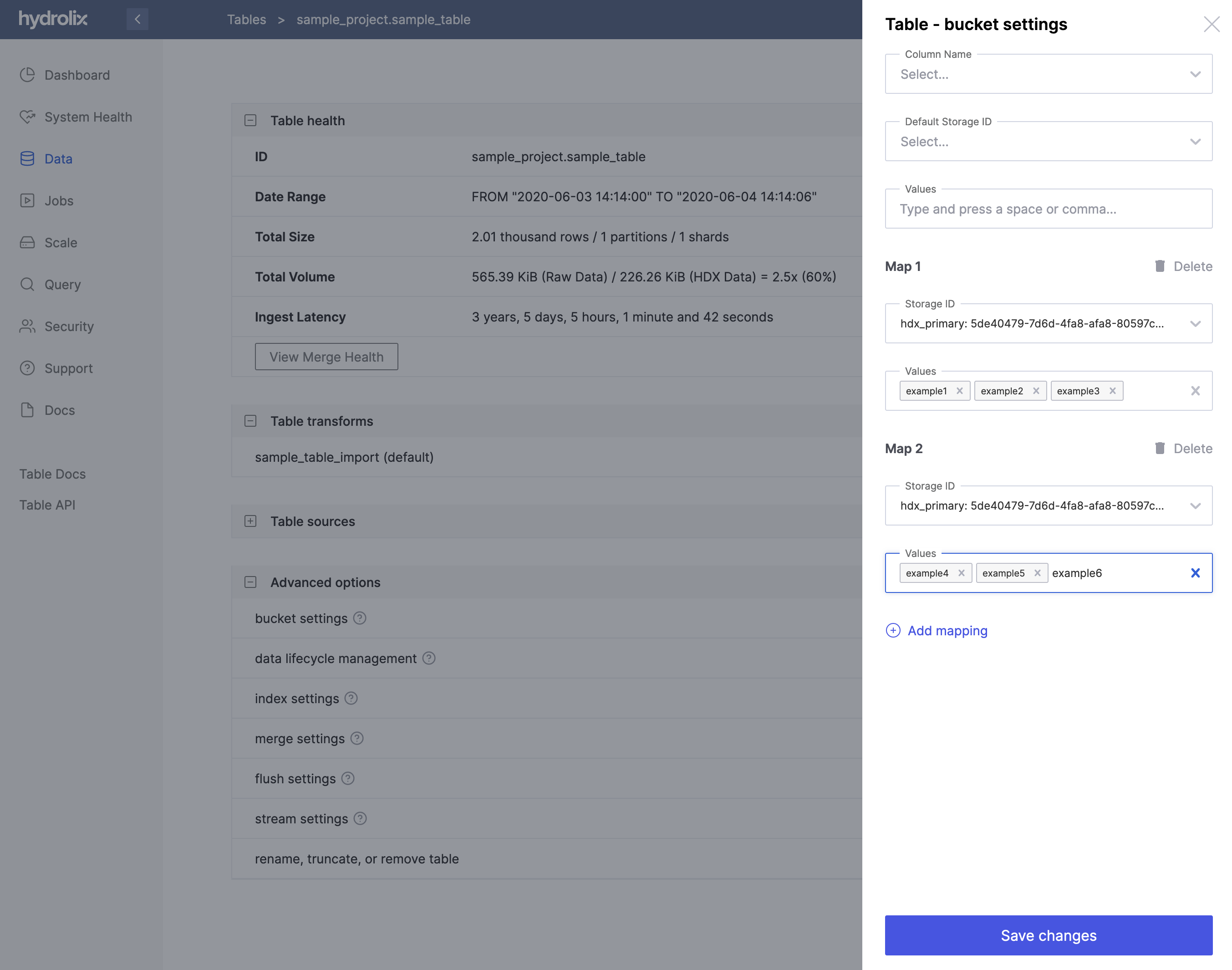
You can also configure storage mappings in the Hydrolix UI:
- Log into the UI at
https://hostname.hydrolix.live. - Click Data in the left nav.
- Select the project and table you want to configure.
- In Advanced Options, select the for bucket settings and Edit.
- Input the mapping column under Column Name.
- Click Add mapping.
- In the right nav, click Add mapping to configure a storage mapping.
- In the Storage ID dropdown, select the ID of the storage where you'd like to store a subset of data.
- In Values text entry box, enter the values you would like to map to the storage bucket you just selected. Press Space after entering a value to persist it to the list of mapping values.
- Configure additional mappings by clicking Add mapping and repeating the previous 3 steps.
- Click Save changes to persist your storage mapping settings for the table.
Enable using API⚓︎
Define the default_storage_id for the table. Incoming columns without an explicit mapping are stored in the default table storage.
Collect lists of the values explicitly to be sent to each specific storage object ID.
Available methods for creating and modifying a table's settings to control the column value mapping:
- Initially configure and activate the feature using table endpoints. The
column_namemust be defined using this endpoint. - Use the bucket_settings endpoints which limits management to the
column_value_mappingdictionary andspread_listsettings.
Use the table endpoints⚓︎
- Save the response from a GET table endpoint to a file.
-
Modify the file with the storage UUIDs. Add this entry to the
settings:Add a Storage Map Column Values Mapping - Each key in the
column_value_mappingmust be a valid storage ID. See validation.
- Each key in the
-
Send the request to the PUT table settings endpoint.
-
Confirm the presence of the
column_nameandcolumn_value_mappingin the response.Expected column value mapping settings fragment in API response
Table Using Column Value Mapping - The ingestion system selects the default storage for all column values not explicitly mapped elsewhere.
- Specify the column name to use for sharding to different storage locations.
- Explicitly map a list of values to a specific storage ID, here
DE,FR, andITcreate a single shard and are stored at the same storage location.
Complete API response object
- The ingestion system selects the default storage for all column values not explicitly mapped elsewhere.
- Specify the column name to use for sharding to different storage locations.
- Explicitly map a list of values to a specific storage ID, here
DE,FR, andITcreate a single shard and are stored at the same storage location.
Change mappings with bucket settings endpoints⚓︎
The bucket settings endpoint allows management of table settings for column_value_mapping and spread_list only. This limits risk of accidental change to other table settings. The bucket settings endpoint can't change the default_storage_id or column_name.
-
Create a settings fragment containing all desired mappings.
Create a Storage Map Column Values Mapping Settings Fragment - Each key in the
column_value_mappingmust be a valid storage ID. See validation.
- Each key in the
-
Send the request to the PATCH bucket settings endpoint.
-
Confirm the presence of the
storage_map.column_value_mappingin the response.Expected column value mapping settings fragment in API response
Table Using Column Value Mapping - The ingestion system selects the default storage for all column values not explicitly mapped elsewhere.
- Specify the column name to use for sharding to different storage locations.
- Explicitly map a list of values to a specific storage ID, here
DE,FR, andITcreate a single shard and are stored at the same storage location. - It's acceptable to map values to the default storage.
Complete API response object
- The ingestion system selects the default storage for all column values not explicitly mapped elsewhere.
- Specify the column name to use for sharding to different storage locations.
- Explicitly map a list of values to a specific storage ID, here
DE,FR, andITcreate a single shard and are stored at the same storage location. - It's acceptable to map values to the default storage.
Validation⚓︎
A bucket must exist and be usable when creating a storage object. This configuration time check prevents usage of invalid or unavailable buckets.
The Config API validates that storage objects used in the column_value_mapping exist when configuration is applied.
Use cases⚓︎
- Compliance: Keeping data in a particular region may be a compliance requirement. For example, GDPR.
- Security: You can segment data by customer. Data for a subset of customers may require additional layers of security.
Limitations⚓︎
- Only one column may be defined as the
column_namefor the feature. - Both
column_nameandcolumn_value_mappingmust be specified to activate the feature. - The column value mapping feature won't be active if spread list is enabled for the table.
- Separating data into multiple storage buckets can impact system performance depending on your query patterns and resources.