Query System Network Errors
This page describes diagnostics for network communications in the query system. This includes all of the distributed applications inside and outside of a Hydrolix cluster, including the client, the catalog, and the storage system.
Network errors in query system⚓︎
This diagram shows how the query system's components communicate over the network.
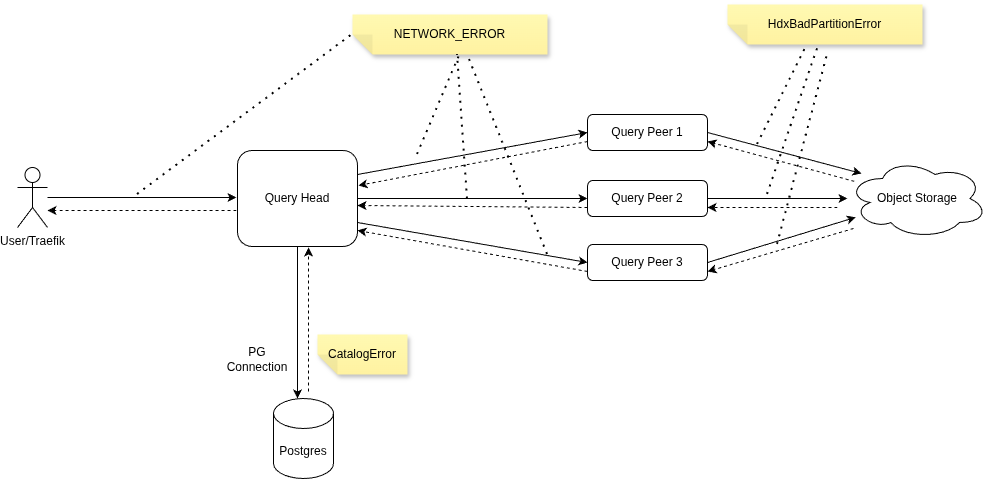
Queries fail without successful communication between these components.
Network data flows⚓︎
Every query uses a minimum of four network connections.
- Client application outside the cluster always connects to the query head.
- Query head always connects to the catalog.
- Query head connects to at least one query peer.
- Each query peer connects to storage systems.
Begin diagnostics for query failures at the query head. Trace the query ID assigned to the query at the query head through the system.
Disruption scenarios⚓︎
Each scenario describes what happens to a query, and what the query head logs, when one of these connections is disrupted.
Client to query head⚓︎
All network communications disruptions between client and query head prevent the client from receiving a successful result.
flowchart LR

client[Client]
query-head[Query Head]

client -- TCP or HTTP --> query-head
query-head -- OK, query result --> client
query-head -. Error, query head logs NETWORK_ERROR .- client- Client initiates a TCP connection to an accepted application query interface. This is often HTTP.
- The Traefik reverse proxy selects an available query head. Connection is established.
- Client transmits the query to the query head, which executes the query.
- The query head writes the final output to the user.
- If the connection breaks, the query head logs
NETWORK_ERROR.
When the network connection to the client is broken, the query head cancels related connections. If these connections are with query peers, they might log errors, as well.
Example query head error messages
Remote client closed connection abruptly
Remote client closed connection gracefully
Query head to catalog⚓︎
All network communications disruptions between query head and catalog result in a failed query.
flowchart LR

query-head[Query Head]
catalog[Catalog]

query-head -- PostgreSQL over tcp/5432 --> catalog
catalog -- OK, sequence of catalog responses --> query-head
catalog -. Error, query head logs CatalogError .- query-head- At startup, the query head initiates a long-lived TCP connection to the PostgreSQL catalog.
- The connection remains for the lifetime of the query head.
- If the connection breaks, the query head attempts to establish a new, persistent connection.
- The query head logs a
CatalogErrorfor any network-related errors, such as timeout or broken connections. - Disrupted communications with the catalog prevent the query head from handling new queries and might disrupt active queries.
Queries which have already been assigned to peers may succeed, even if there's disruption between the query head and catalog. New queries could fail if the query head can't establish a new connection with the catalog.
Query head to peer⚓︎
The query head maintains connections to multiple query peers.
flowchart LR

query-head[Query Head]
query-peer[Query Peer]

query-head -- assignment over tcp/9000 --> query-peer
query-peer -- OK, intermediate results --> query-head
query-peer -. Error, query head logs NETWORK_ERROR .- query-head- The query head initiates a connection to a query peer on tcp/9000.
- The query head transmits the derived query, assigned partition, and other control signals to the query peer.
- The query peer responds with the progress information and intermediate results.
- If the connection breaks, the query head logs
NETWORK_ERROR.
Example query head error messages
Query peer not listening
Query peer didn't complete connection setup
Query peer took too long; timed out
Query peer to storage⚓︎
Each query peer retrieves raw data from object storage.
flowchart LR

query-peer[Query Peer]
storage[Storage]

query-peer -- HTTP byte ranges --> storage
storage -- OK, Partition data --> query-peer
storage -. Error, peers log HdxBadPartitionError .- query-peer- The query peer initiates an HTTP request to the object storage endpoint.
- The query peer sends HTTP byte range requests for partition data.
- The storage application returns requested data responses.
- The query peer logs
HdxBadPartitionErrorfor all errors, including network-related issues.
Common failure patterns⚓︎
Communication inside the cluster is usually more reliable than network connections to clients and object storage. When one of the applications, especially the query head, experiences disruption, it can break connections with others, leading to network error messages in the logs.
Query failure examples⚓︎
In all of these cases, the query fails.
| Failure case | What happens |
|---|---|
| Query head crash, for example out-of-memory (OOM) or a segfault | Client sees broken connection. |
| Unrecoverable network errors between the client and the query head | The connection breaks and the query head cancels any connected peers. |
| Unrecoverable errors between a query head and a query peer | The query head returns an error to the client and cancels any connected peers. |
| A query triggers a circuit breaker | The query head returns an error to the client and cancels any connected peers. |
When failure or cancellation occurs, the query head and each query peer logs a failure message.
Unrecoverable errors⚓︎
The following are unrecoverable errors between query heads and peers.
- Connection refused
- Connection reset or broken while reading data
- Timeout exceeded while waiting for data
- Attempt to read after end of file (EOF), which can be triggered by OOM or segfault
Query success⚓︎
In this case, the query succeeds and logs might contain error messages.
- When using SQL
LIMITor the latest N rows optimization, the query head sends a cancel request to connected peers indicating it no longer needs any more rows to satisfy the query.
In this case, the query head logs success and any query peer receiving a cancel request will log an error, even though the query succeeds.