Stream Debugging
Configure Components⚓︎
Traefik⚓︎
Minimum instances: 2
To check the number of instances currently running, run the following command:
To change the number of instances, adjust the following section of your Hydrolix cluster configuration:
Intake Head⚓︎
Minimum instances: 1
To check the number of instances currently running, run the following command:
To change the number of instances, adjust the following section of your Hydrolix cluster configuration:
Something not working?
Start at Troubleshooting Symptoms and Fixes. Find the symptom, confirm it with the signal listed there, and follow the link to the procedure.
Endpoint Errors⚓︎
Issue: Client Connection Timeout⚓︎
Check the Traefik replica count⚓︎
One cause of a client connection timeout is that no Traefik replica was available to accept the connection. Check that Traefik has at least one replica:
| Check the Traefik Replica Count | |
|---|---|
Fix the Traefik replica count⚓︎
Scale Traefik in the Hydrolix cluster spec:
For more information, see scale profiles
Check IP allowlist⚓︎
Check IP Allow list has the requesting IP address.
Fix IP allowlist⚓︎
Export the current manifest.
Add the IPs to the manifest.
Load the updated manifest into the cluster.
| Apply the Configuration | |
|---|---|
The operator detects the change and reconciles the cluster to match. No operator restart is needed.
For more information about IP Allowlists, see Configure IP Access.
Issue: HTTP 429 Errors from Intake Head⚓︎
Check HTTP 429 errors⚓︎
Browse to https://{hostname}/prometheus and run the following query:
| PromQL: Rate per second of 429 errors faceted by service | |
|---|---|
The numeric result for {service="intake-head"} shows the rate per second of 429 errors emitted by intake head over the last 30 minutes.
Fix HTTP 429 errors⚓︎
-
Scale intake head in the Hydrolix cluster spec:
For more information about scale profiles, see the Scale Profiles documentation.
-
Enable the intake spill feature.
Issue: 503 Service Temporarily Unavailable⚓︎
Check intake head HTTP 503s⚓︎
Browse to https://{hostname}/prometheus and run the following query:
| PromQL: Rate per second of 503 errors faceted by service | |
|---|---|
The numeric result for {service="intake-head"} shows the rate per second of 503 errors emitted by intake head over the last 30 minutes.
A 503 usually means no intake head replica was available to serve the request, so check the replica count next:
| Check the Intake Head Replica Count | |
|---|---|
Fix intake head HTTP 503s⚓︎
Scale intake head in the Hydrolix cluster spec:
For more information about scale profiles, see the Scale Profiles documentation.
Issue: Intake head 4XX⚓︎
Check intake head HTTP 400s⚓︎
Check the protocol and URL path.
Fix intake head HTTP 400s⚓︎
Path and protocol should be in the format
http://hostname.hydrolix.live/ingest/event
or
https://hostname.hydrolix.live/ingest/event?table=project_name.table_name&transform=transform_name
Check client headers and parameters⚓︎
Confirm the headers and query string parameters on requests sent to intake head are correct.
Fix client headers and parameters⚓︎
When using headers, the following should be provided in the HTTP request.
Hydrolix Headers:
x-hdx-table: project.tablex-hdx-transform: transformName
Content-type (or)
content-type: application/jsoncontent-type: text/csv
Or, if you use a query string:
table=project.tabletransform=transformName
Note the content type header should be set if CSV or JSON as above.
For more information about the API, see the documentation on Streaming Ingest API.
Check compression format matches⚓︎
Check the transform has the correct compression format and that headers sent by the ingesting system are the correct format.
Fix compression format matches⚓︎
If unsure, set the compression types as None in the transform. The system will infer the compression type based on the headers in the request.
Issue: Ingested Data Doesn't Appear in Table⚓︎
Check incoming payloads match transform⚓︎
Review intake head logs, looking for messages of level Error.
Check:
- Datetime format for Primary. This is often the cause of rejection of rows.
- Strings are trying to be stored as a UINT.
- Transform File type CSV/JSON
Fix incoming payloads match transform⚓︎
Review transform and edit accordingly.
Check data stream type matches⚓︎
Review intake head logs.
Check:
- Datetime format for Primary. This is often the cause of rejection of rows.
- Strings are trying to be stored as a UINT.
- Transform File type CSV/JSON
- Transform SQL
Fix data stream type matches⚓︎
Review transform and edit accordingly.
Kubernetes Errors⚓︎
Issue: Out of Memory (OOMKill) Errors in Turbine⚓︎
Check which pods are being OOM-killed⚓︎
The affected pods could be intake-head, kinesis-peer, kafka-peer, or akamai-siem-peer.
Fix OOMKill errors⚓︎
Configure the OOMKill detector and data splitter. See OOMKill Troubleshooting.
Streaming Service Components⚓︎
HTTP Streaming ingest uses the intake head component to process incoming data, with the Traefik load balancer directing traffic to intake head.
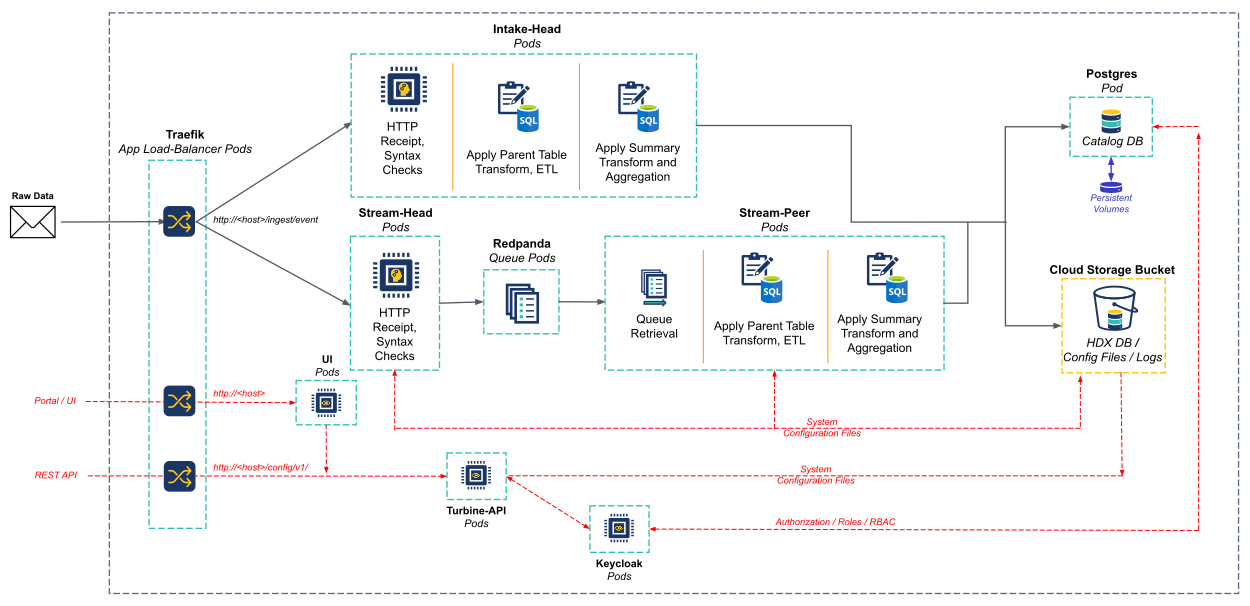
Stream-head and stream-peer are deprecated
The stream-head and stream-peer components shown in the diagram are deprecated.
Accessible through the path: https://hostname.hydrolix.live/ingest/event
| Component | Used to |
|---|---|
| Traefik - Application Load-balancer | Routes requests to appropriate end-points. Requests to the path /ingest are routed to intake head components. API and UI requests are routed using their own paths. |
| Intake head | Checks that messages conform to basic syntax and message structure rules. When a message passes these checks, it sends the message to a listing queue. When a message fails these checks, it returns an HTTP 400 response to the client. It applies the Hydrolix transform and outputs indexed database partitions to the Hydrolix Database bucket. It also reports created partition metadata to the Catalog. |
| Catalog | Stores information on the basic storage structure and partitions of the data within Cloud Storage (GCS, S3 etc). Includes a persistent volume within Kubernetes. |
| Cloud Storage Bucket | Storage bucket (GCS, S3 etc) containing the “stateful” data required to run the system, including configuration files (/config/), database (/db/) and a copy of the system logs (/logs/). |
| UI | User interface / Portal. Is built upon the Turbine-API. |
| Turbine-API | REST based API for configuration of the data system. Includes API end-points for creation, deletion, editing of tables and their transforms (schemas). |
| Keycloak | Provides authorization and RBAC for access to the Turbine-API and the Portal. Stores metadata and user information with the Catalog DB instance. |