Data Enrichment
Very often you need to modify data before it's stored. Hydrolix has the ability through an additional process that can be invoked through the transform being utilised for loading data.
To modify and enrich data, SQL statements can be utilized within the transform. These statements have access to all the functions, methods, operators and advanced features that can be found with the Query capabilities offered by Hydrolix. This includes more advanced features such as Custom Functions and Custom Dictionaries .
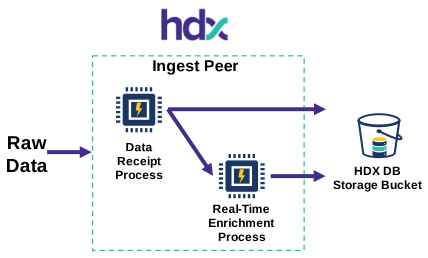
These SQL statements are referred to as "SQL Transforms." Include them in the settings section of your transform under the sql_transform key.
Example: Splitting Message Into Separate Column⚓︎
To best explain how this process works an example is provided below. The following raw data is supplied and requires enrichment/modification.
The enrichment and modification required includes:
- The
requestcolumn to be split into 3 separate columns:method,pathandprotocol. - For privacy purposes we need to obfuscate the
remote_ipto remove the last octet.
Write arbitrary SQL queries on incoming data stream to perform real-time enrichment.
In the query above we use functions already available to operate on the raw data.
- The
splitByWhitespacesplits up therequestobject in our raw data into its component parts separated by white space. - The
IPv4NumToStringClassCandtoIPv4remove the last octet from the IPv4 address in theremote_ipobject.
In addition, the * has been added to the query to ensure all the columns are made available on top of the virtual ones that are created with our SELECT query.
Lastly, as the data is being processed as a stream, the FROM portion of the statement uses a special {STREAM} term to reference the incoming data.
The SQL statement is then added to the sql_transform object within the settings object in the transform.
In order to ensure the data is then written to the table the Transform needs to be updated with the new virtual columns generated by the SQL statement. For example:
In the example the full transform is as follows:
After transforming and indexing the data the result looks like the following:
CSV file as data source
In the example above, the file type is JSON, however when the file type is CSV the source should be empty when creating the transform. The name needs to match the name in the SQL transform.
Example removing rows based on pattern⚓︎
Another common example is to be able to remove rows based on specific pattern.
Let's say you want to avoid indexing rows where User-Agent contains *bot* we can express this with the following statement:
This will do the split we created previously but won't select / index rows containing *bot*.
Example splitting of key value pair string⚓︎
When extracting key value pairs, consider storing data in the map datatype. A good example is query string from a request:
"querystring": "version=1&user=anonymous&cache=false"
Technically we could index the whole querystring as string directly, but searching might be difficult.
The following function extract_key_pair will split the string into a map of key pair value:
This function takes 3 parameters, the string you want to split, the separator between the different key/pair and finally the separator between the key/value.
Going back to the querystring example we could use the function:
Result will be:
MAP values require the same type
By default map value will be indexed as string
Going back to our main example:
We can now use the following SQL transform:
And to include the querymap you need to add the following output column in your transform:
Import the function
In order for this to work, you need to import the function into your project and replace the $projectname in the SQL statement with your project
Validation of transform SQL⚓︎
When you save this resource, Hydrolix validates the SQL you provide by passing it through hdx_verify_sql, a ClickHouse table function that parses and analyzes the semantics of the query without executing it.
hdx_verify_sql checks for:
- Syntax errors such as unclosed strings, unbalanced parentheses, missing keywords, or malformed statements
- References to non-existent tables or databases
- Type errors, for example arithmetic on incompatible types
Validation doesn't catch:
- References to non-existent functions
- Undefined variables
- Whether referenced tables contain data
- Query performance or cost
- Access control or row/column-level permissions
- Runtime errors
If the query service is temporarily unavailable, validation is skipped and the save is allowed to proceed.
Related information⚓︎
- Clean your data quickly - Using transform SQL to filter, normalize, and sanitize data during ingest
- Join Your Data at Ingest Time - How to enrich incoming data by joining against dictionaries and lookup tables at ingest
- MaxMind Geo Lookup - Adding geolocation enrichment to ingest using the MaxMind database as a Hydrolix dictionary