CacheFly
CacheFly is a real-time content delivery network (CDN) that accelerates serving web content and services to end users. CacheFly can caches and deliver content directly to users rather than fetching it from the origin for every visitor.
CacheFly supports pushing logs to an HTTP endpoint, which Hydrolix supports. These logs contain structured fields such as request timestamps, client IPs, cache status, and response metrics, enabling visibility into CDN performance, reliability, and content delivery.
Follow the instructions on this page to stream CacheFly logs into Hydrolix.
Setup steps⚓︎
There are some prerequisites and three major steps covered in this document. Following these steps will result in an integrated setup between CacheFly and a running Hydrolix cluster:
- Before you Begin: Complete these prerequisites first
- Configure a Hydrolix Transform: Prepare Hydrolix to receive and transform CacheFly log data
- Configure CacheFly log shipping: Add Hydrolix as a log target in CacheFly to send HTTP logs to Hydrolix
- Verification: Follow these steps to verify the integration is working correctly
Before you begin⚓︎
You will need a CacheFly account and a running Hydrolix deployment. Follow the instructions for your preferred deployment method if you have yet to deploy Hydrolix. From your running Hydrolix cluster, you will need the following information:
Gather the following information:
| Item | Description | Example value | How to obtain this information |
|---|---|---|---|
| Cluster ingest URL | This is the hostname and ingest endpoint of your Hydrolix cluster. | https://hostname.hydrolix.live/ingest/event |
The value of hydrolix_url in your hydrolixcluster.yaml including the preceding https://. |
| Table name | The destination table in the Hydrolix cluster for CacheFly CDN logs. Specified in the format: project_name.table_name. |
cachefly_project.cachefly_cdn_logs |
See create a table if you need to create a Hydrolix table in which to store your CacheFly CDN logs. |
| Basic authentication credentials | The username and password to authenticate with the Hydrolix endpoint and grant streaming ingest access to the destination table. | Username: hydrolixPassword: $TRAEFIK_PASSWORD |
For a more thorough explanation of basic authentication as it pertains to a Hydrolix cluster, see Enable Basic Authentication. |
Keep these values on hand for later steps within this guide.
Get started⚓︎
There are two steps covered within this document. Following these steps will result in an integrated setup between CacheFly and a running Hydrolix cluster:
Configure a Hydrolix transform⚓︎
Register a Hydrolix transform. The transform defines a schema to map fields from the CacheFly logs onto the Hydrolix table.
Using the Hydrolix transform for CacheFly, see Publish Transform for instructions.
You have two options for the publishing the transform:
-
UI: Registering a transform through the UI requires the following information:
- Project name
- Table name
- The contents of the
output_columnsproperty
-
API: Registering a transform through the API requires the following information:
- Project ID
- Table ID
- The entirety of the CacheFly transform json
If the transform you have created is the only one for your table, it will become the default transform for the table. If you have multiple transforms configured for the destination table, and the transform registered for CacheFly CDN data isn't the default transform, you should specify the transform for this data as a query parameter in the endpoint URL.
Verify that the Hydrolix transform exists. You can do so using either method:
- UI: In the UI by navigating to Data in the left-hand nav, selecting the table from under the Tables tab, and locating the transform name under Table transforms.
- API: Verify the transform you created is returned as part of the response from the Get transforms endpoint.
Keep the transform name on hand for the next step.
Configure CacheFly log shipping⚓︎
Follow these steps to configure CacheFly log shipping to send data to your Hydrolix cluster:
- From the CacheFly portal, select the Configuration menu and then select Log Targets.
-
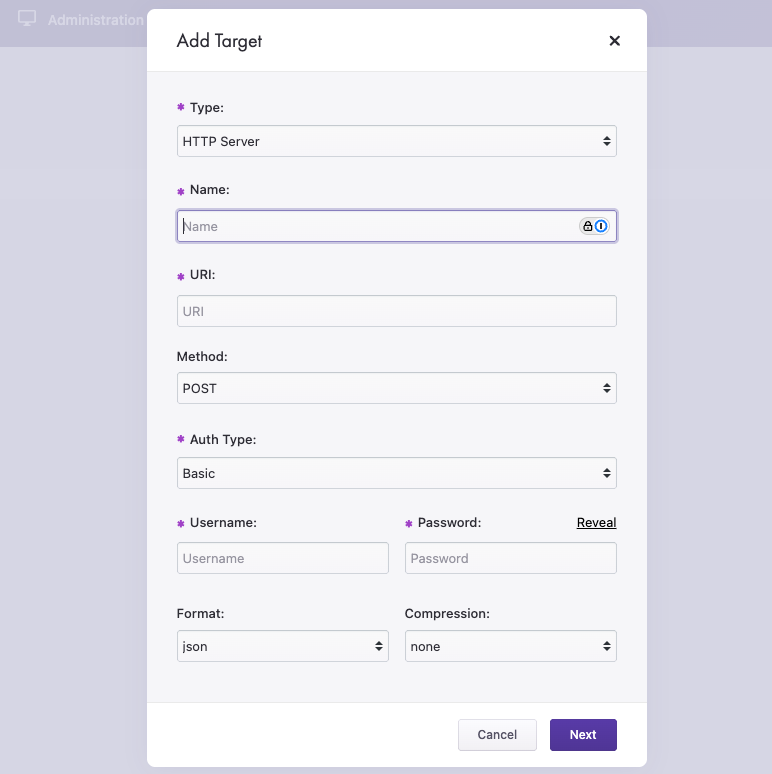
Select the New Target button, which opens the following form.
-
Fill out the form with these values:
-
Type: HTTP Server
- Name: Hydrolix (or choose your own)
-
URL: Enter the following URL, replacing the
{}fields:Hydrolix HTTP Streaming Ingest endpoint
When to use the transform query parameter
If the CacheFly transform is the default transform for the Hydrolix table, you can omit the transform query parameter (?&transform={transform_name}).
- Method: Post
- Auth Type: Basic
- Username: your username, to authenticate with the Hydrolix endpoint
- Password: your password, to authenticate with the Hydrolix endpoint
- Format: json
- Compression: gzip
Verification⚓︎
To verify that the integration is working correctly:
- Wait a few minutes for data to start flowing from CacheFly to Hydrolix.
- In the Hydrolix UI, navigate to the query interface. (
https://hostname.hydrolix.live/queries/). -
Run a simple query against your able. For example:
-
Verify that you see results similar to your data in CacheFly.
Going further⚓︎
- For more information on querying your Hydrolix cluster, see ClickHouse SQL.
- Explore your CacheFly logs in Grafana dashboards
Troubleshoot⚓︎
If you encounter issues with the integration:
Verify your Hydrolix bearer token is valid and hasn't expired⚓︎
- If you receive a
401 Unauthorizedresponse, the authorization token may have expired. Retrieve a new one using the Hydrolix login API endpoint.
Review the ingest logs in Hydrolix for errors⚓︎
- View and explore cluster logs on the cluster's System Health page.
- You can also query cluster logs directly with Hydrologs.
Check ingest latency in table health⚓︎
Table health reports Ingest Latency for each table. A latency measured from the epoch (January 1st, 1970 at 00:00:00 UTC) means the table has never received data.
A recent latency doesn't prove your source is working. If the table also receives other streams, their data keeps the figure low on its own.
Ensure your transform correctly maps the fields you expect to see⚓︎
- The Hydrolix transform provided acts as a schema for storing HTTP requests from CacheFly log fields in Hydrolix. If you forward another data set to Hydrolix, see the Hydrolix documentation on transform output columns to modify the transform to correctly map the data you are sending.