MCP Server
The Hydrolix MCP Server enables LLM clients to interact with Hydrolix databases through the Model Context Protocol (MCP). This integration allows language models to query data, explore databases, and analyze information directly from a Hydrolix cluster, letting end users explore their Hydrolix clusters using natural language prompts.
What's the Model Context Protocol
MCP is not the AI application itself, but rather the bridge between the AI application and your data. The AI application handles reasoning and natural language, while the MCP server handles authentication, query execution, and data access.
Choose your deployment mode⚓︎
Hydrolix MCP supports two deployment modes: a remotely hosted MCP server or a local one. Both provide identical capabilities and use the same authentication.
| Remote MCP (HTTP/SSE) | Local MCP (stdio) | |
|---|---|---|
| How it runs | Server-side in a Hydrolix cluster | On a local machine |
| Installation | None. Connect using a URL. | Requires Python 3.13+ and the uv package manager |
| Best for | Web-based AI tools, teams that require centralized access | Local development |
| Works with | Any client that supports the Model Context Protocol | Any client that supports the Model Context Protocol |
| Available since | Hydrolix v5.10 | Hydrolix v5.9 |
Remote MCP (HTTP/SSE)⚓︎
Remote MCP runs in a Hydrolix cluster. No local installation is required. MCP-compatible AI tools connect to the remote MCP server URL using one of two supported transport modes:
- HTTP: Remote access over HTTP
- SSE: Server-Sent Events for streaming responses
Quickstart⚓︎
Connect to the MCP server at https://hostname.hydrolix.live/mcp, authenticating with either a service account token (preferred) or basic credentials. See the Authentication section for details.
Remote client configurations⚓︎
Remote Claude Code⚓︎
Configuration
Remote ChatGPT Enterprise⚓︎
ChatGPT Enterprise supports HTTP mode only. Follow the instructions in Add custom MCP server. ChatGPT can't send an Authorization header, so select No authentication and put the authorization token in the server URL: https://hostname.hydrolix.live/mcp?token={my-api-token}.
Other HTTP-capable Clients⚓︎
Point any HTTP-capable MCP client at https://hostname.hydrolix.live/mcp and pass your authorization token as in the HTTP Authorization header or ?token= query parameter.
Local MCP (stdio)⚓︎
Local MCP runs as a process on your machine and uses the stdio (Standard input/output) transport mode.
Before you begin⚓︎
Before configuring the Hydrolix MCP Server, ensure you have the following:
- Python 3.13 or later
- uv package manager
- Set the environment variables
- Authentication credentials (API token or username/password)
Install uv⚓︎
The uv package manager is required to run the Hydrolix MCP Server in the stdio mode. The uvx launcher used in the configuration examples ships with uv. Install it using one of the following methods:
After installation, verify that uv is available:
| Verify uv installation | |
|---|---|
For more installation options and details, see the uv documentation.
Environment variables⚓︎
The Hydrolix MCP Server requires certain environment variables to connect to your cluster.
- Required:
HYDROLIX_URL: The canonical public URL of your Hydrolix cluster, for examplehttps://hostname.hydrolix.live(required for all configurations). The deprecatedHYDROLIX_HOSTvariable (hostname only, no scheme) is still honored but should be replaced withHYDROLIX_URL. - Optional: Additional configuration options control endpoint overrides, timeouts, query limits, transport method, and server binding preferences. For the complete and definitive list, refer to
docs/CONFIG.mdin the MCP Hydrolix GitHub repository.
Control a local MCP server (stdio) by setting these optional variables in the server's environment. For remote MCP running in a Hydrolix cluster, set the cluster's mcp_hydrolix tunable.
| Variable | Description | Default |
|---|---|---|
HYDROLIX_QUERY_TIMEOUT_SECS |
Execution timeout for a single query, in seconds. | 120 |
HYDROLIX_QUERY_MAX_MEMORY_USAGE |
Maximum memory a single query may use, in bytes. | 4294967296 (4 GiB) |
HYDROLIX_QUERY_MAX_ATTEMPTS |
Number of times a query peer may attempt the query before the query head cancels it. | 1 |
HYDROLIX_QUERY_MAX_RESULT_ROWS |
Maximum number of rows a query may return. | 100000 |
HYDROLIX_QUERY_MAX_RESULT_BYTES |
Maximum size of a query result on the query head, in bytes. The minimum is 10000. |
67108864 (64 MiB) |
HYDROLIX_MAX_RESULT_CELLS |
Maximum number of result cells (rows × columns) to return before truncation. | 50000 |
HYDROLIX_MAX_RESULT_CELLS_LIMIT |
Hard cap on the cell budget a caller can ask for. 0 means no cap. |
0 |
HYDROLIX_QUERY_TIMERANGE_REQUIRED |
Whether a SELECT query must constrain the table's primary timestamp. |
true |
HYDROLIX_MAX_RAW_TIMERANGE |
Maximum time range, in seconds, for queries against non-summary tables. This limit doesn't apply to summary tables. | 86400 (24 hours) |
HYDROLIX_QUERY_POOL |
Routes every query to the named query pool by setting the hdx_query_pool_name query option. The named pool must already exist on the cluster. |
None (the cluster's default query peer pool) |
HYDROLIX_QUERY_HEAD_POOL |
Routes the connection to a query head pool. If the named pool isn't configured on the cluster, the connection falls back to the cluster's default query head pool. | None (the cluster's default query head pool) |
For remote MCP, the cluster's mcp_hydrolix tunable sets these values. On Hydrolix versions 6.3 and 6.4, its defaults for three of them are lower:
HYDROLIX_QUERY_TIMEOUT_SECS:30HYDROLIX_QUERY_MAX_MEMORY_USAGE:2147483648(2 GiB)HYDROLIX_MAX_RAW_TIMERANGE:21600(six hours)
HYDROLIX_QUERY_MAX_MEMORY_USAGE, HYDROLIX_QUERY_MAX_ATTEMPTS, HYDROLIX_QUERY_MAX_RESULT_ROWS, and HYDROLIX_QUERY_TIMERANGE_REQUIRED require Hydrolix MCP Server v0.3.4 or later, which Hydrolix version 6.3 deploys for remote MCP.
HYDROLIX_QUERY_MAX_RESULT_BYTES requires Hydrolix MCP Server v0.3.7 or later.
A caller can request a different HYDROLIX_MAX_RESULT_CELLS budget. HYDROLIX_MAX_RESULT_CELLS_LIMIT caps what they can request.
HYDROLIX_QUERY_TIMERANGE_REQUIRED is on by default. A SELECT against a table must constrain the primary timestamp, which prevents full table scans.
HYDROLIX_QUERY_POOL selects a query peer pool for each query, while HYDROLIX_QUERY_HEAD_POOL selects a query head pool for the whole connection. Query head pools require Hydrolix version 5.11 or later. On clusters where query head pooling isn't configured, leave HYDROLIX_QUERY_HEAD_POOL unset; a connection routed to a pool that doesn't exist falls back to the cluster's default query head pool.
Certificate trust for the MCP server
Over TLS, the MCP server verifies the cluster's certificate. By default it trusts the operating system's certificate store as well as its own defaults, so an internal PKI installed at the OS level is honored.
Set the mcp_hydrolix tunable's truststore_disable attribute to true to trust only the Python environment's default authorities. It defaults to false and is available in Hydrolix v6.1.5 and later.
This attribute chooses which authorities are trusted. It doesn't turn verification off. To disable verification, set HYDROLIX_VERIFY to false.
Local client configurations⚓︎
These configuration examples cover popular MCP clients. Consult your preferred client documentation for specific instructions on how to configure an MCP server.
Local Claude Desktop⚓︎
To configure the MCP server for Claude Desktop, add the following entry to your claude_desktop_config.json file:
| Claude Desktop Configuration | |
|---|---|
Local Claude Code⚓︎
For Claude Code CLI, use the claude mcp add command to add an MCP server:
If you use query parameter authentication, reconnect to the server using the CLI once per session
Local Cursor IDE⚓︎
To configure the MCP server for Cursor, add the following entry to your Cursor
mcp.json settings file:
| Cursor MCP Configuration | |
|---|---|
Local ChatGPT Enterprise⚓︎
ChatGPT Enterprise supports HTTP mode only, not local mode. To set it up, see Remote ChatGPT Enterprise.
Other clients⚓︎
For other LLM platforms that support MCP integration, follow the client's specific MCP configuration instructions.
The general pattern for stdio mode requires:
- The
uvxcommand (which ships withuv) as the server executor - Arguments that install and launch the package at runtime:
--python 3.13 --refresh-package mcp-hydrolix mcp-hydrolix - Environment variables for
HYDROLIX_URLand authentication credentials
Consult the platform's MCP documentation for the exact configuration file location and format.
Authentication⚓︎
The MCP server supports multiple authentication methods with the following precedence (highest to lowest):
- Header: Per-request authorization token provided by the
Authorization: Bearer <my-api-token>header. See Remote Claude Code or Local Claude Code for examples. - Query parameter: Per-request authorization token provided by the
?token=<my-api-token>query parameter. See Remote Claude Code or Local Claude Code for examples. - Environment variables: Basic credentials or an auth token configured using environment variables.
When multiple authentication methods are configured, the server uses the first available method in the precedence order.
Per-request authentication is only available when using HTTP or SSE transport modes
Using a service account token with a read-only role is recommended
Available tools⚓︎
The MCP server provides these tool descriptions to the LLM client.
run_select_query: Executes SQL querieslist_databases: Displays all databases on the clusterlist_tables: Shows tables in a specified databaseget_table_info: Gets table metadata such as the schema
Usage tips⚓︎
To use the MCP server effectively, follow these best practices to improve query construction.
Take the following basic prompt:
| Basic prompt | |
|---|---|
Specify the database and table names clearly in the request.
| Prompt with database and table names | |
|---|---|
Include specific time ranges in queries to leverage primary key optimizations.
| Prompt with time range | |
|---|---|
Request timestamp-ordered output for better performance.
| Final Prompt with ordered output | |
|---|---|
The result is a more efficient query that returns only relevant data.
Reconnect⚓︎
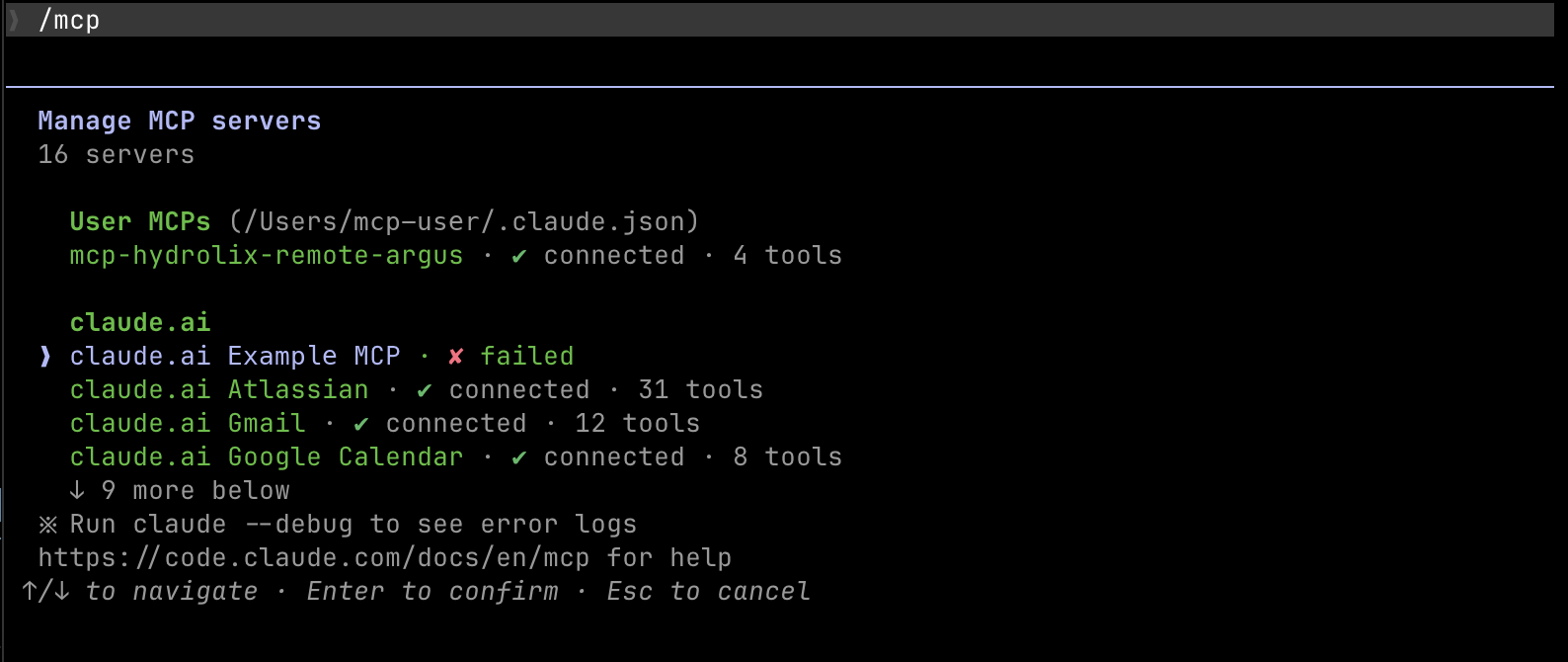
If a session with the MCP server is interrupted, use these steps to reconnect. Use these steps to reconnect a Claude Code client.
-
Navigate to the Manage MCP servers panel in the client. Select the broken connection to move to the reconnection pane.
-
From the reconnection pane, select the Reconnect option.
1Don't select **Authenticate**. This causes the reconnection to fail.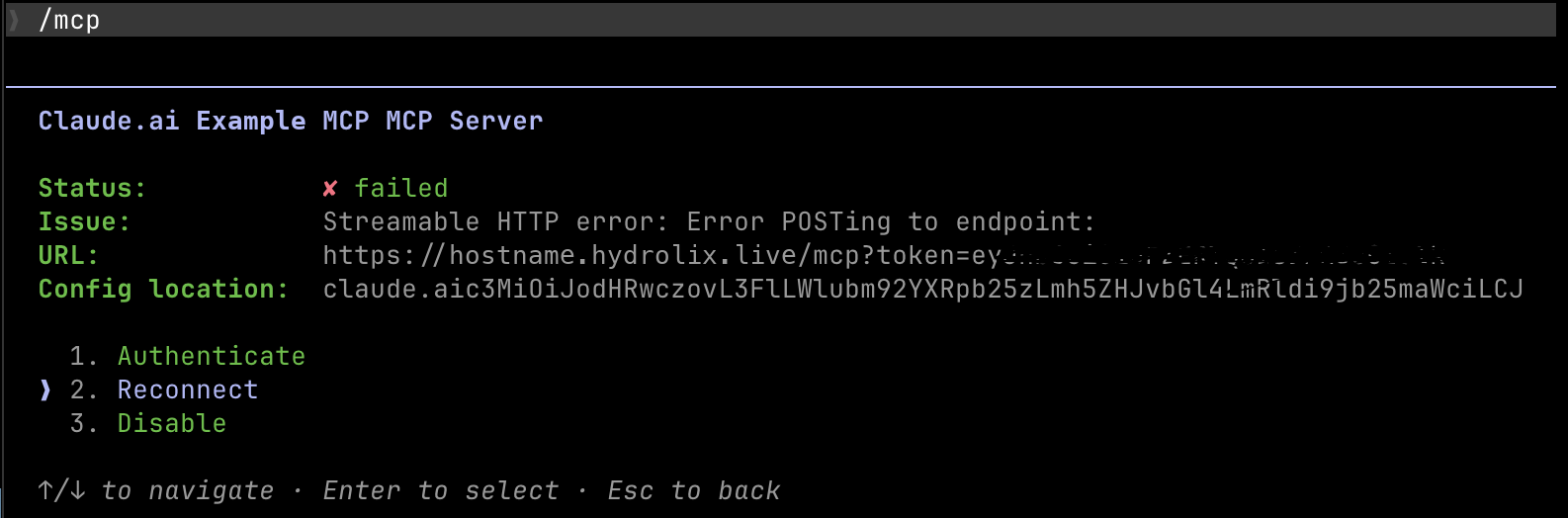
-
View the status bar to confirm reconnection success.

Architecture diagrams⚓︎
The MCP server has two deployment models: local (stdio) where it runs on the client machine, and remote (HTTP/SSE) where it runs within the Hydrolix cluster.
Local (stdio)⚓︎
---
config:
  themeVariables:
    fontSize: 18px
---
graph LR
  classDef default stroke:#00A99D,stroke-width:2px
  User[User]
  LLM[LLM Client]
  MCP[Hydrolix MCP Server]
  Cluster[Hydrolix Cluster]

  User -->|Prompt| LLM
  LLM -->|"MCP request<br/>(stdio)"| MCP
  MCP -->|SQL Queries| Cluster
  Cluster -->|Query Results| MCP
  MCP -->|Structured Data| LLM
  LLM -->|AI Response| User

  class MCP local
  class Cluster remote
Remote (HTTP/SSE)⚓︎
---
config:
  themeVariables:
    fontSize: 18px
---
graph LR
  classDef default stroke:#00A99D,stroke-width:2px
  User[User]
  LLM[LLM Client]

  subgraph "HydrolixCluster"
      MCP[Hydrolix MCP Server]
      QueryHead[Query Head]
  end

  User -->|Prompt| LLM
  LLM -->|"MCP request<br/>(HTTP/SSE)"| MCP
  MCP -->|SQL Queries| QueryHead
  QueryHead -->|Query Results| MCP
  MCP -->|Structured Data| LLM
  LLM -->|AI Response| User

  classDef nodegroup fill:none,stroke:#8B9FAD,stroke-width:2px,stroke-dasharray:5 4,color:#4A5F73;
  class HydrolixCluster nodegroup
Related information⚓︎
- MCP Hydrolix GitHub Repository
- Model Context Protocol Documentation
- ClickHouse Client
- HTTP Query API
- Natural Language Queries With Hydrolix - How the Hydrolix MCP Server enables natural language querying through AI assistants